> For the complete documentation index, see [llms.txt](https://www.pentestwiki.com/llms.txt). Markdown versions of documentation pages are available by appending `.md` to page URLs; this page is available as [Markdown](https://www.pentestwiki.com/docker-and-kubernetes/automountserviceaccounttoken.md).
# automountServiceAccountToken
automountServiceAccountToken은 SA(Service Account) 토큰을 자동으로 컨테이너에 마운트하는 설정입니다.
이 설정은 기본적으로 true 값을 갖기 때문에, 개발자가 의도적으로 값을 false로 변경하지 않는 이상 Pod의 `/var/run/secrets/kubernetes.io/serviceaccount/token` 경로에 토큰이 마운트됩니다.
| automount | ServiceAccountName | 결과 |
| --------- | ------------------ | ----------------- |
| true(기본) | 미지정 → default | default SA 토큰 마운트 |
| true(기본) | 생성한 SA | custom SA 토큰 마운트 |
| false | | 토큰 마운트 X |
이 시나리오에서 악용할 상황은 다음과 같을 때 발생합니다.
* default SA에 추가적인 권한을 할당했을 경우
* default SA가 아닌 custom SA의 토큰 정보가 마운트된 경우
## Abuse
# SA 토큰 확인
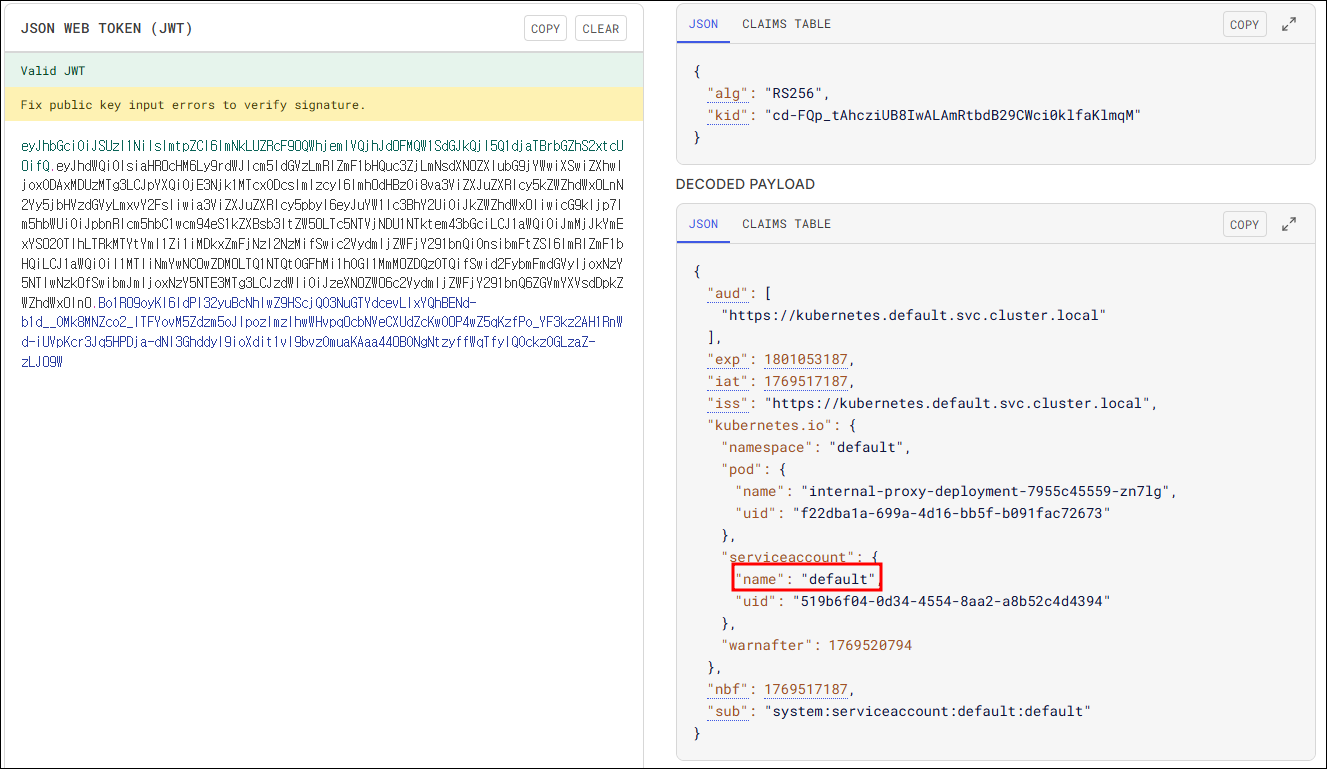
cat /var/run/secrets/kubernetes.io/serviceaccount/token
출력된 JWT 토큰을 디코딩하여 serviceaccount 필드의 값을 통해 기본 계정인지 판단할 수 있습니다.
## References
{% embed url="" %}