# Inline hooking

인라인 후킹은 타겟 함수의 실제 코드에 직접 패치를 넣어, 코드 흐름을 다른 함수 또는 분석 코드로 우회시키는 기법입니다.

<figure><img src="/files/RjYixoLyymJpldnN9nwW" alt=""><figcaption><p><a href="https://rninche01.tistory.com/entry/Hooking-%EC%95%85%EC%84%B1%EC%BD%94%EB%93%9C-%EA%B4%80%EB%A0%A8">https://rninche01.tistory.com/entry/Hooking-%EC%95%85%EC%84%B1%EC%BD%94%EB%93%9C-%EA%B4%80%EB%A0%A8</a></p></figcaption></figure>

EDR이 프로그램을 인라인 후킹하여 조건에 따라 분기하는 과정을 실습하기 위해 다음 깃허브로부터 파일을 빌드합니다.

* <https://github.com/CCob/SylantStrike>
* <https://gist.github.com/ChoiSG/2e86452b01d95b1d4725938eeab2717a>

SylantStrike를 빌드하면 SylantStrike.dll과 SylantStlikeInject.exe가 생성되고 ChoiSG 깃허브의 C# 파일을 저장한 뒤 빌드하면 exe 파일이 생성됩니다.

{% hint style="info" %}
C# 파일명은 자유롭게 저장하면 되며, 본 페이지에서는 maldev.exe로 빌드하였습니다.
{% endhint %}

후킹을 하지 않은 상태로 maldev.exe를 실행한 뒤, Windbg에서 Attach to process를 통해 디버깅을 하면 NtProtectVirtualMemory 어셈블리 코드가 아래와 같이 확인됩니다.

<figure><img src="/files/YguvgWZnZHr8jyleNsln" alt=""><figcaption><p>후킹 전 NtProtectVirtualMemory 함수 어셈블리 코드</p></figcaption></figure>

이번엔 SylantStrikeInject.exe를 사용하여 maldev.exe를 인라인후킹한 뒤 maldev.exe를 실행합니다.

```powershell
.\SylantStrikeInject.exe --process=maldev.exe --dll=C:\SylantStrike-master\x64\Debug\SylantStrike.dll
```

<figure><img src="/files/CftPfssa87sqImPzlrcb" alt=""><figcaption></figcaption></figure>

NtProtectVirtualMemory 함수를 어셈블리어로 확인하면 인라인 후킹이 되어 즉시 `00007ffb09f80fd6` 주소의 디토어 함수의 진입점으로 점프하는 것이 확인됩니다.

<figure><img src="/files/pl4uR992JuYG6ErxdH0C" alt=""><figcaption><p>디토어 함수 진입점</p></figcaption></figure>

점프하도록 설정된 주소의 어셈블리 코드를 확인하면 `00007ffb09f80fdc` 포인터로 점프하고, 해당 포인터가 가리키는 주소에서는 `00007ffa8c3f1168` 주소를 가리킵니다.

<figure><img src="/files/JgPOOKPdS9HmZ2dSI0Qs" alt=""><figcaption></figcaption></figure>

마지막으로 `00007ffa8c3f1168` 주소의 어셈블리 코드를 uf(unassemble function)로 확인합니다.

해당 코드는 디토어 함수 내에서 eax가 40h와 같다면 EDR에서 탐지하여 메시지 박스를 띄우고, 같지 않다면 원래 코드 실행 흐름(트램펄린)을 호출합니다.

1번 영역이 EDR에서 프로그램 내 NtProtectVirtualMemory 함수 실행을 탐지하여 띄우는 분기이고 2번 영역이 원래 NtProtectVirtualMemory 함수 실행 흐름을 호출하는 코드입니다.

<figure><img src="/files/7ooSzha6whxPp7FxRkiC" alt=""><figcaption><p>디토어 함수 내부 조건분기 코드</p></figcaption></figure>

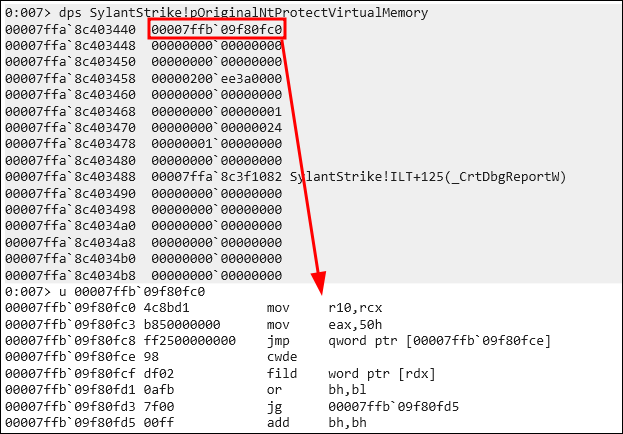
실제로 트램펄린이 어떻게 동작하는지 확인하기 위해선 2번 영역의 흐름을 따라갈 수 있는데, 코드 상에서는 `00007ffa8c403440` 주소의 8바이트 주소만큼을 호출하고 있습니다.

<figure><img src="/files/SxIbfUEq93ieCsLNyNeJ" alt=""><figcaption><p>트램펄린 함수</p></figcaption></figure>

8바이트 주소의 어셈블리 코드를 확인하면 후킹 전의 기존 NtProtectVirtualMemory 함수 코드가 나타납니다. 이러한 이유는 트램펄린은 기존의 코드 흐름을 따라가도록 설계되어야 하기 때문입니다.

이어서 `jmp qword ptr [00007ffb09f80fce]` 주소를 따라가면 기존의 NtProtectVirtualMemory 함수의 나머지 부분이 확인됩니다.

<figure><img src="/files/V6lsZIjFixV9hTyDHgl3" alt=""><figcaption><p>트램펄린 함수 이후 NtProtectVirtualMemory 함수 코드</p></figcaption></figure>

## References

{% embed url="<https://www.xn--hy1b43d247a.com/defense-evasion/userland-hooking>" %}

{% embed url="<https://rninche01.tistory.com/entry/Hooking-%EC%95%85%EC%84%B1%EC%BD%94%EB%93%9C-%EA%B4%80%EB%A0%A8>" %}


---

# Agent Instructions: Querying This Documentation

If you need additional information that is not directly available in this page, you can query the documentation dynamically by asking a question.

Perform an HTTP GET request on the current page URL with the `ask` query parameter:

```
GET https://www.pentestwiki.com/defense-evasion/hooking/inline-hooking.md?ask=<question>
```

The question should be specific, self-contained, and written in natural language.
The response will contain a direct answer to the question and relevant excerpts and sources from the documentation.

Use this mechanism when the answer is not explicitly present in the current page, you need clarification or additional context, or you want to retrieve related documentation sections.