> For the complete documentation index, see [llms.txt](https://www.pentestwiki.com/llms.txt). Markdown versions of documentation pages are available by appending `.md` to page URLs; this page is available as [Markdown](https://www.pentestwiki.com/defense-evasion/bypass-dynamic-detection/ppid-spoofing.md).
# PPID Spoofing
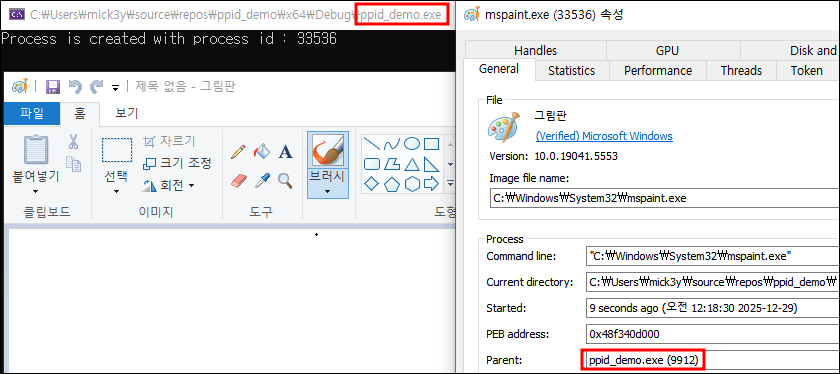
실행된 프로세스에서 또 다른 프로세스를 실행했을 때 파생된 프로세스를 자식 프로세스라 부르고, 자식 프로세스의 정보에서 PPID(Parent Process ID)는 파생한 프로세스의 PID가 됩니다.
대부분의 Windows 환경에서 프로세스 트리는 다음과 같은 구조를 가집니다.
```
System (PID: 4)
├─ smss.exe
├─ csrss.exe
├─ wininit.exe
│ └─ services.exe
│ ├─ svchost.exe (여러 개)
│ ├─ spoolsv.exe
│ └─ 기타 서비스들...
│
├─ winlogon.exe
│ └─ userinit.exe
│ └─ explorer.exe ← 사용자 쉘
│ ├─ 사용자가 더블클릭한 모든 것
│ ├─ chrome.exe (브라우저 실행)
│ └─ cmd.exe (명령 프롬프트)
│ └─ malware.exe (악성코드)
```
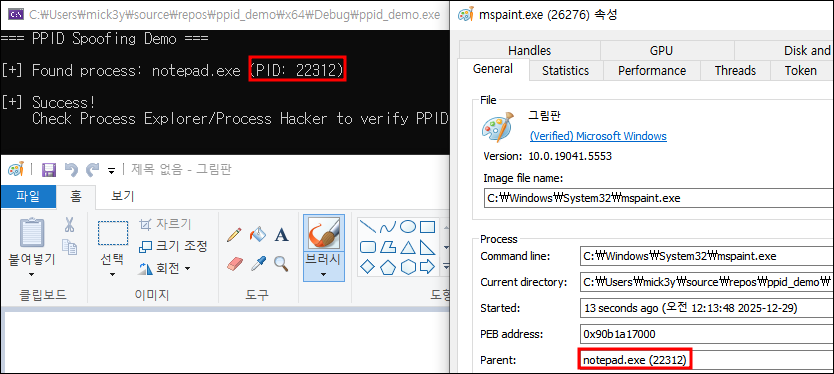
대부분의 EDR/AV 도구에서는 Word → PowerShell 과 같이 정상적인 상황에서는 보이지 않는 프로세스 트리를 감시하기 때문에 이를 우회하기 위해 PPID를 위조하는 PPID 스푸핑 공격을 활용합니다.
메모장을 부모 프로세스로 삼아 그림판을 실행하는 예제 코드는 [깃허브 링크](https://github.com/KR-mick3y/AV-Evasion/blob/main/dynamic-detection/ppid_spoofing/ppid_spoofing.cpp)에서 다운로드 할 수 있습니다.