# Exchange Server

1. Exchange Server 구성에 사용할 관리자 계정 생성 및 Enterprise Admins, Schema Admins 그룹에 추가

<figure><img src="/files/82liXPyjJYY3QjaUpxiO" alt=""><figcaption></figcaption></figure>

2. Exchange Server 구성에 필요한 모듈(ASP.NET, IIS, HTTP, 인증, 클러스터링, ADDS, Outlook 등) 설치

```powershell
Install-WindowsFeature NET-Framework-45-Features, Server-Media-Foundation, RPC-over-HTTP-proxy, RSAT-Clustering, RSAT-Clustering-CmdInterface, RSAT-Clustering-Mgmt, RSAT-Clustering-PowerShell, WAS-Process-Model, Web-Asp-Net45, Web-Basic-Auth, Web-Client-Auth, Web-Digest-Auth, Web-Dir-Browsing, Web-Dyn-Compression, Web-Http-Errors, Web-Http-Logging, Web-Http-Redirect, Web-Http-Tracing, Web-ISAPI-Ext, Web-ISAPI-Filter, Web-Lgcy-Mgmt-Console, Web-Metabase, Web-Mgmt-Console, Web-Mgmt-Service, Web-Net-Ext45, Web-Request-Monitor, Web-Server, Web-Stat-Compression, Web-Static-Content, Web-Windows-Auth, Web-WMI, Windows-Identity-Foundation, RSAT-ADDS
```

3. Exchange Server 구성에 필요한 파일 다운로드

* <https://dotnet.microsoft.com/ko-kr/download/dotnet-framework/thank-you/net48-offline-installer>
* <https://dotnet.microsoft.com/ko-kr/download/dotnet-framework/thank-you/net48-kor>
* <https://www.microsoft.com/ko-kr/download/details.aspx?id=30679>
* <https://www.microsoft.com/en-us/download/details.aspx?id=34992>
* <https://download.microsoft.com/download/1/2/8/128E2E22-C1B9-44A4-BE2A-5859ED1D4592/rewrite_amd64_ko-KR.msi>

4. Exchange Server ISO 다운로드

* <https://www.microsoft.com/en-us/download/details.aspx?id=106402>

5. Exchange Server ISO 탑재

<figure><img src="/files/8i5NlcQLMFtEM3fH659U" alt=""><figcaption></figcaption></figure>

6. 파워쉘을 통해 Exchange Server ISO 무인 설치 진행

```powershell
.\Setup.exe /IAcceptExchangeServerLicenseTerms_DiagnosticDataON /PrepareSchema
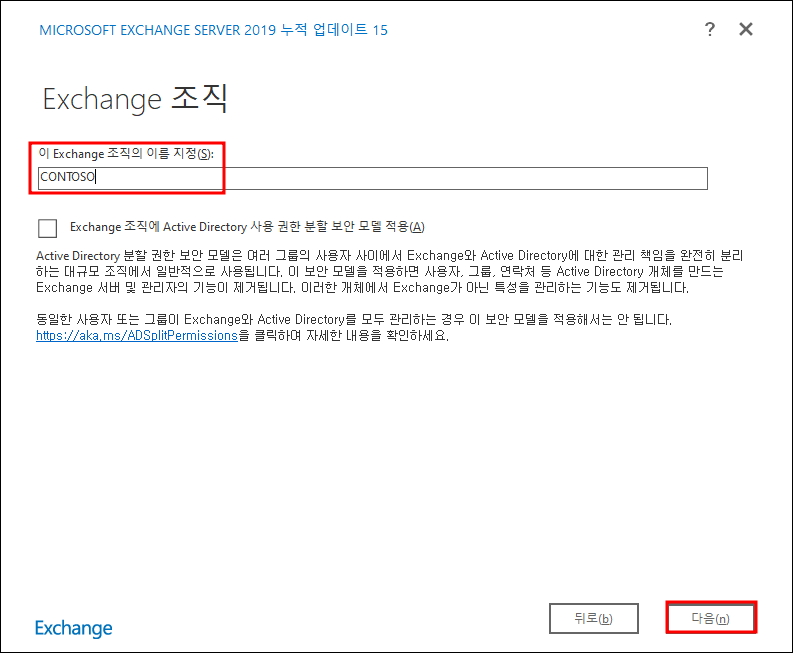
.\Setup.exe /IAcceptExchangeServerLicenseTerms_DiagnosticDataON /PrepareAD /OrganizationName:"CONTOSO"
```

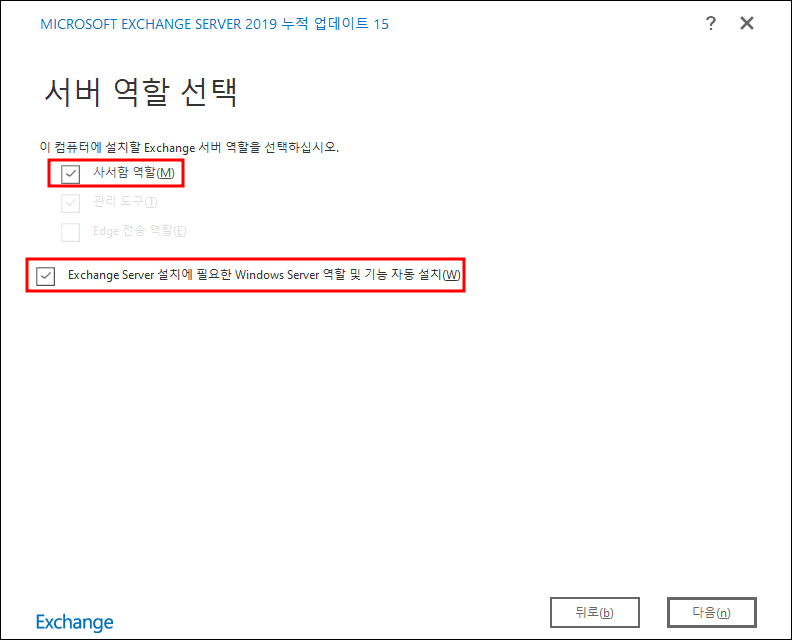
7. Exchange Server ISO 탑재 디렉토리 내 Setup.exe 파일 관리자 실행 후 다음 순서로 설치

<figure><img src="/files/uekNYd9YIcXn4Cfz5wem" alt=""><figcaption></figcaption></figure>

<figure><img src="/files/WZ6sh3lUZRjVOl0nROk5" alt=""><figcaption></figcaption></figure>

<figure><img src="/files/2bPxETX0GkGfCyVWI3Pc" alt=""><figcaption></figcaption></figure>

<figure><img src="/files/AtQhz4HPqUgmuMhn3b17" alt=""><figcaption></figcaption></figure>

<figure><img src="/files/a2fnseWJ6atLAf7stZdw" alt=""><figcaption></figcaption></figure>

<figure><img src="/files/gvpj61LUevq2v9Rdh5RT" alt=""><figcaption></figcaption></figure>


---

# Agent Instructions: Querying This Documentation

If you need additional information that is not directly available in this page, you can query the documentation dynamically by asking a question.

Perform an HTTP GET request on the current page URL with the `ask` query parameter:

```
GET https://www.pentestwiki.com/home-lab/active-directory/exchange-server.md?ask=<question>
```

The question should be specific, self-contained, and written in natural language.
The response will contain a direct answer to the question and relevant excerpts and sources from the documentation.

Use this mechanism when the answer is not explicitly present in the current page, you need clarification or additional context, or you want to retrieve related documentation sections.