# Public Blob Storage

Azure의 Blob Storage는 데이터를 저장하는 서비스로 AWS의 S3 버킷과 동일한 개념입니다.

## Abuse

<pre class="language-bash"><code class="lang-bash"><strong># Public static web에 대한 리소스 열거
</strong>curl "https://'&#x3C;storage-account>'.blob.core.windows.net/$web?restype=container&#x26;comp=list" | xmllint --format -

<strong># 모든 블롭 버전 열거
</strong>curl -H "x-ms-version: 2019-12-12" "https://'&#x3C;storage-account>'.blob.core.windows.net/$web?restype=container&#x26;comp=list&#x26;include=versions" | xmllint --format -
</code></pre>

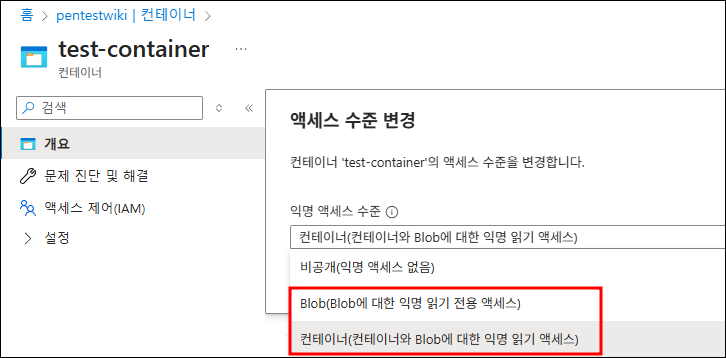
스토리지와 컨테이너에 대한 익명 접근이 모두 활성화 되어 있을 때, 컨테이너 내부 특정 파일이나 컨테이너의 모든 파일에 대해 익명 권한으로 접근이 가능합니다.

<div><figure><img src="/files/Kyd2tc68sSfkRNcSimUi" alt=""><figcaption><p>Storage Setting</p></figcaption></figure> <figure><img src="/files/QHqYUKc2pvn2xXWKV1Uh" alt=""><figcaption><p>Container Setting</p></figcaption></figure></div>

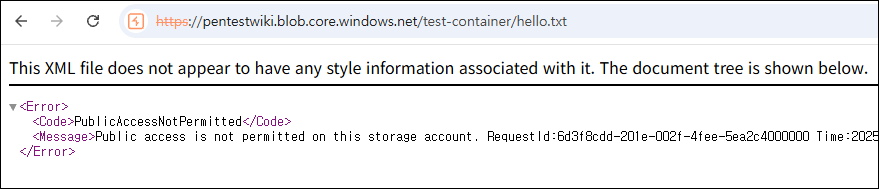
반면, 둘 중 하나라도 익명 접근이 허용되지 않는다면 아래와 같이 접근 오류가 반환됩니다.

<div><figure><img src="/files/Ww7gYOk1y9myYP3C8O84" alt=""><figcaption><p>Private Blob</p></figcaption></figure> <figure><img src="/files/oonNAijjQXBztPJAgsRj" alt=""><figcaption><p>Public Blob</p></figcaption></figure></div>


---

# Agent Instructions: Querying This Documentation

If you need additional information that is not directly available in this page, you can query the documentation dynamically by asking a question.

Perform an HTTP GET request on the current page URL with the `ask` query parameter:

```
GET https://www.pentestwiki.com/cloud/azure/public-blob-storage.md?ask=<question>
```

The question should be specific, self-contained, and written in natural language.
The response will contain a direct answer to the question and relevant excerpts and sources from the documentation.

Use this mechanism when the answer is not explicitly present in the current page, you need clarification or additional context, or you want to retrieve related documentation sections.